From the published jobto the new hire's first month.
Publish the job on your own careers page, score every application against the same ruler, and welcome the person you hired into a journey that opens on their phone from a link. At the end, what each person read, answered and signed is on the record.
The journey opens from a link, with no password and no licence
Acceptance recorded with date and person
Acceptance recorded with date and person
From job post to month one, in one short video.
The job posted with its criteria stated, screening with the summary Synapse's AI writes, the hire, the onboarding track built from your documents, and the personal question routed to HR.
Watch · 1:19 · 37 sIllustrative view of the product, with example data. The video has no sound: the captions are on screen.Read what the video shows
People: from job ad to month one. From job ad to a new hire's first month: every application scored against the same ruler.
From the job ad to the new hire's first month. Hiring and onboarding in one flow, on record.
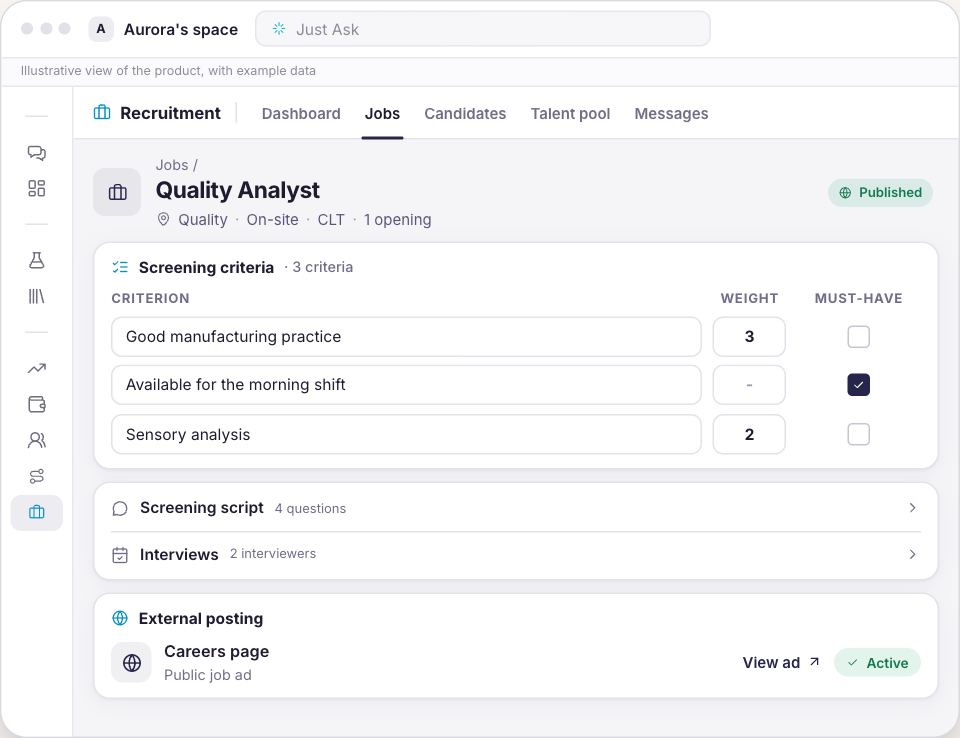
Job posted, ruler declared. No screening criteria? The job doesn't go live.
Wherever they apply, one pipeline. Careers page, WhatsApp and Telegram, in one pipeline.
Every application, the same ruler. A score, its rating and the Synapse summary.
The candidate picks the time. Propose interview lines up the interviewers' availability.
Hired? Now on the team. Hire creates the employee with the default track.
A track built from your documents. Read and fill in: every field shows its source file.
On mobile, no password. Quizzes explain why. I've read and agree is logged.
Ask any time. Get the source. Personal data? Forwarded to HR.
Who's ahead, who needs you. In progress, Behind and Forwarded questions.
From job ad to month one. Every step on record. Meet Synapse.
The same first week, two ways.
Drag the line and see the difference between piecing it together later and having the answer now, with the source beside it.
Tabs open between the CV and the candidate spreadsheet
19:40Whoever started on Monday has had nothing yet
927Without Synapse
How many days of paternity leave do I have?
Twenty calendar days from the birth, and the certificate goes to HR within 30 days.
employee-handbook.pdfbenefits-guide.docx
With Synapse
From the published job to the signed acceptance.
Every step happens on a screen you will find after signing up, under the same name it has in the menu.
Recruitment
The job live, on your own page
Create the job, declare the screening criteria and publish. Your company's careers page works with no credential at all. LinkedIn and Gupy are connectors you configure with your own account's credential, and when a channel fails the screen names the one that failed instead of calling the posting done.
Applications by WhatsApp, by Telegram and through the jobs page, all in one pipeline
Approval with authority rules by salary band, department, seniority or type of position
Whoever sends it for approval sees which approvers will be required before sending
Recruitment
The same ruler for whoever arrived in March and whoever arrived in May
The criteria are frozen the moment the job is published, and every application shows which version of the ruler scored it. Editing the configuration later applies to the next applications, without reprocessing the old ones. And the screen will not publish a job with no criteria declared: with no criteria there is no ruler.
An assessment criterion by criterion, each carrying the CV excerpt behind it
The candidate picks the interview slot from a link, out of the interviewers' real diaries
Every interviewer fills in the same scorecard, and the screen shows where they agree and where they do not
Onboarding
The track is built out of the documents you already have
Pick one of the two ready processes, attach the employee handbook, the benefits guide and the code of conduct, and ask it to read and fill in. The fields come back filled, each one showing which file and which sentence the information came from. A field the documents do not answer comes back blank, and you confirm instead of typing.
A short process, around 5 days, 4 stages and 14 missions, ready to adopt
A long one, around 30 days, 6 stages and 24 missions, for whoever answers to an auditor
Four kinds of mission inside a stage: content, quiz, task and signed acceptance
My Journey
The first week opens on the new hire's phone
The person you hired gets a link that opens the journey on their phone: no password, no sign-up, nothing to install and no user licence spent. Each stage ends with a quiz built from the company's own documents, and every answer explains why it is right or wrong and points at the document it came from.
The link is shown once: lose it and you generate another, and the previous one dies on the spot
Policy acceptance recorded with date and person, which is what you show when someone asks
Whoever stalls gets a reminder; if they stay stalled, it goes up to the manager instead of becoming another reminder
Onboarding
The assistant answers what the company wrote, and only that
The new hire asks inside the journey, or through the company's WhatsApp and Telegram, and gets the answer with the document behind it. When the question is about the person, their salary, their holiday, the assistant does not guess: it hands the question to the registered manager and files it in a queue HR reads.
The answer comes with the name of the document it came from
With no manager on record it says it could not hand the question over, and points the person to HR
The channel is for questions; missions, quizzes and acceptances are done from the journey link
Communication Center
The company reaches the team where it already is.
One place to send announcements, notices and surveys to your workforce — over WhatsApp, Teams, Slack and internal apps or portals. Every send goes out with a defined audience, approval when there's a sign-off rule, and a record of who received it, who read it and who confirmed.
WhatsAppThe channel most of the team opens first. Great for notices, reminders and quick surveys.
Microsoft TeamsFor the team that lives in Teams. Official announcements land in the channel and in chat.
SlackFor teams already organized in channels. Delivered to the right channel, by area.
App / Internal portalWhere the announcement is kept and policy acceptance is recorded with date and person.
How it works
1
Write the announcement
Type it, or ask the AI to draft it from a topic or a company document. The text comes back ready for you to review, not to approve blind.
2
Choose the audience and the channel
Whole company, area, unit, shift or role. Pick where it goes: WhatsApp, Teams, Slack, app or portal — one channel or several at once.
3
Go through approval, when required
An announcement with a sign-off rule only goes out after the approver. The sender sees which approvers will be required before sending.
4
Send and track
The message goes out over the chosen channels and the screen shows delivery, reads and acceptance. Whoever didn't confirm gets a reminder; what's on the record is what the company shows when asked.
Ready-to-adapt templates
Pick the type of message, swap the fields in braces and send it through the suggested channel.
Official announcementTeams · Slack · PortalWhole company
📣 {subject}
Team, {main message in one sentence}.
{short context: why now}.
What changes for you: {practical impact}.
Effective from {date}.
Questions? Reply here or reach out to {owning area}.
Urgent / operational noticeWhatsAppUnit · Shift
⚠️ Notice {unit} — {date}{time}{situation in one line}.
Action now: {what to do}.
We'll update here as soon as it's back to normal.
Policy with recorded acceptancePortal + noticeRole · Area
📄 New version of {policy name} published.
Read it and record your acceptance by {date}:
{link}
The acceptance is recorded with your name and the date — it's what the company shows when asked.
Pulse / climate surveyWhatsApp · SlackArea
💬 1 minute, {n} questions: how was your week?
{link}
Anonymous. We close on {date} and share the results back with the team.
Who can send, to whom and over which channel is set by role. An announcement with a sign-off rule goes through approval before it leaves, and every send is recorded: audience, channel, time, delivery, reads and acceptance.
From the open job to the first acceptance, in the same week.
1
Publish the job
Declare the screening criteria, go through approval where an authority rule applies, and publish on your careers page.
2
Build the track from your own documents
Pick one of the two ready processes, attach the handbook and the code of conduct, check what came back filled in and activate the track.
3
Send the link
Hire in the pipeline and the person appears under Employees with the track already assigned. Generate the link, send it wherever your company already talks to them, and watch who has read and signed.
One door, bought whole.
People brings recruitment and onboarding, plus what comes with every door: chat, projects, templates and the context of your business.
The People door
People
For the company that hires all year round
You see the amount before confirming any charge.
The job published on your company's own careers page
Screening criterion by criterion, with the excerpt behind every score
Two onboarding processes ready to adopt and edit
A journey that opens from a link on the phone, with no password and no licence
A quiz built from the company's documents, with the source in the answer
You create the account and the company space, and the subscription opens right after, with the option picked here.
No lock-in. Cancel whenever you like and keep using it until the end of the paid period.
Why the record holds up.
A score with no evidence does not existEvery criterion carries the CV excerpt the assessment stands on. When the CV says nothing about it, the screen says so instead of filling the gap.
Personal documents stay out of the knowledge baseContract, identity document and medical exam sit in the employee's private storage: they never enter the knowledge base, and no assistant can quote them in an answer.
Consent before the dataThe candidate's consent is recorded before any personal data, and exporting, correcting, erasing and revoking are buttons on the screen, not a request by e-mail.
It says when it does not knowA question about the person is not guessed: it goes to the registered manager. With nobody on record, the assistant says it could not hand it over instead of promising.
On TVBluey, the company behind Synapse, on Globo NSC's TECH SC
Start with Synapse People. Expand without starting over.
The next area joins the same workspace, with the same context, the same AI and the same approval rules.
No. Synapse does not run payroll, does not track hours, does not enrol anyone in a benefit plan and does not run performance reviews. It teaches the benefit and keeps the proof of who read and signed what. Where the company already has an HR system, Synapse reads from it through a connector instead of replacing it.
Can I post to LinkedIn and Gupy?
Your company's careers page works with no credential at all. LinkedIn and Gupy are connectors you configure with your own account's credential; without it the posting fails explicitly, channel by channel, instead of pretending it went out.
How do applications come in?
By WhatsApp, by Telegram and through the jobs page, all landing in the same pipeline. There is no inbound by e-mail.
Does the employee do the track over WhatsApp?
No. The channel is where they ask questions and get notices; the missions, the quizzes and the acceptances are done from the journey link. Whoever asks to carry on through the channel gets the link, not a simulated walkthrough.
What if the person loses the link?
The link is shown once, and the platform only keeps a scrambled version of it: not even we can show it again. You generate another one on the spot, and the previous one stops working at that same moment.
Do I need a corporate e-mail on day one?
No. The journey opens from the link, with no password and without spending a user licence. The automatic notice goes out over WhatsApp or Telegram, when the space has that channel configured, and through the bell inside the platform; by e-mail, you are the one who sends it, pasting the link wherever you like.
Who answers when the question is about the person?
That employee's registered manager. The assistant hands it over, files the question in a queue HR reads, and tells the person. With no manager on record it says it could not hand the question over and points them to HR, rather than promising a handover that will not happen.
Does the interview schedule itself?
The platform crosses the availability windows and the candidate picks the slot from a link. That depends on each interviewer having connected their own Google Calendar: without it the system blocks proposing slots and names who is missing.
Who sees what inside the platform?
Today recruitment visibility is workspace wide: whoever has the permission sees the jobs and the applications. Restricting by department, or to the job assigned to a recruiter, is planned and does not exist yet. The exception is the employee's personal documents, which sit in private storage, outside the knowledge base.
The next person through the door can be the first one with proof.
Build the track from the documents the company already has, and send the link to whoever starts on Monday.