The automation does the heavy lifting and stops exactly where somebody has to look. Who approves is written down before the run even starts, the decision is kept with a name and a time, and what went into and out of every step stays there for anyone who wants to check later.
From designed workflow to approval, in one short video.
The process designed step by step, human review with who approves and by when, the live run, and the recording to replay what happened.
Watch · 1:21 · 34 sIllustrative view of the product, with example data. The video has no sound: the captions are on screen.Read what the video shows
Workflows: processes designed step by step. A multi-step process drawn on a canvas, with human review where it matters.
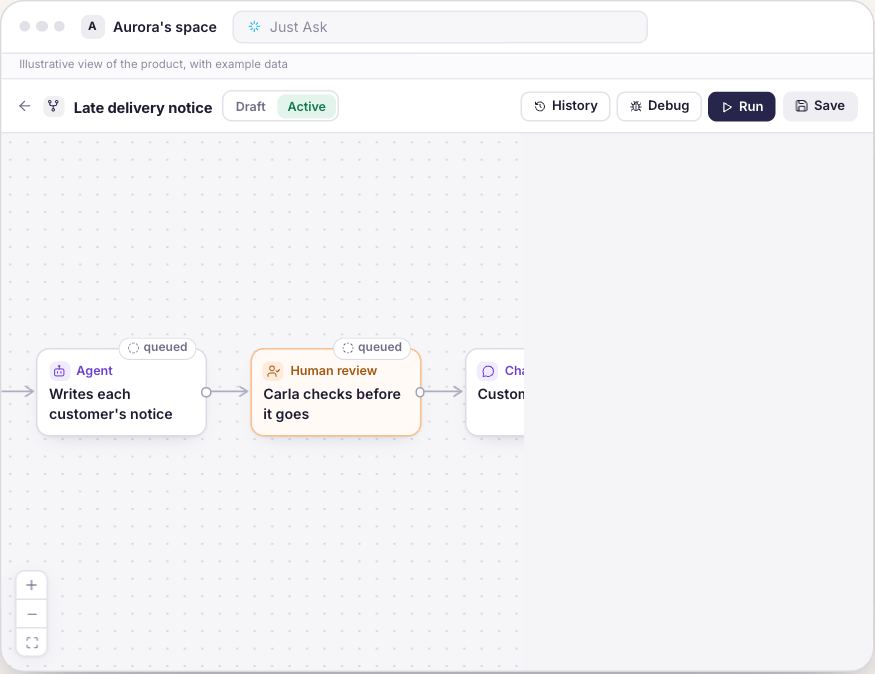
Draw the process. Synapse runs it. Each step is a box, each arrow sets the order.
Thirteen step types, in four groups. Actions, Integrations, Control and People.
Starts on a click, a schedule, or when something happens. Manual, Schedule, Incoming webhook or Event.
Checks the numbers, picks the path. Query data (lake) → Condition: Yes or No.
Before it goes, a person checks. Human review: Who approves and the Instructions for the approver.
No answer in time? The rule set earlier applies. Decision deadline in hours, When time runs out: approve or reject.
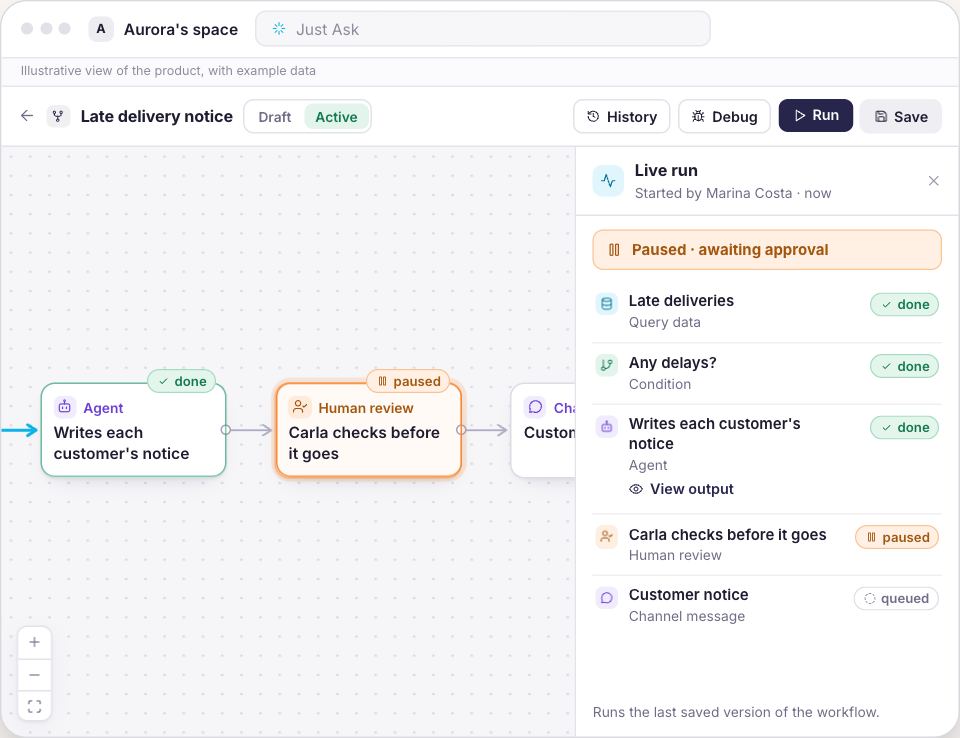
Every step, live. Live run until Paused, awaiting approval.
Pauses before each step so you can inspect it. Debug: Next step, Run to the end or Stop.
Replay what happened. Resume from any step. Replay on canvas, Rerun from this step.
Less improvising. More process, with human review. Meet Synapse.
The same flow, with and without the gate.
Drag the line and compare an automation that acts on its own with one that waits for somebody to decide.
Approval by email
payment_v1.pdfpayment_v2_final.pdfwho signed off on this?
Looking for who authorised it
Message already sent to the client
02:13Working out what the automation did
!?Without approval
Pay the invoices that fall due tomorrow
I prepared the payment and stopped at the approval step. Helena has been told, and nothing goes to the bank before she decides.
HELDstep: Checks before it goesdecided by: Helena Martins
With approval
Autonomy goes as far as your company allows.
Every part of this is a screen in the product, and they all live in one place: the Workflows hub inside Cortex.
Workflows
The run stops at the step that needs a person
Human review is not a notice that flies past, it suspends the run right there, tells whoever decides and only continues once someone approves. Rejecting does not skip the step, it cancels the whole run.
The approval step suspends the flow, every time
The decider is told the name of the flow and of the step
Nothing in the later steps happens without the decision
Workflows
Whoever decides reads what the AI wrote before letting it go
The approval screen shows the draft the way it will go out, next to the instruction whoever built the flow left for the person checking it. You can write a note, and it is kept with the decision.
The draft appears as text, the way it will go out
The instruction from whoever built the flow sits next to it
The note is kept alongside the decision
Workflows
Who approves is written before the flow ever runs
In the editor you pick the people who may decide on that step, and you write what they should check. If nobody is picked, the request falls to whoever triggered the run, to the owner of the flow or to whoever administers the space, and it never simply passes.
Reviewers named on the step itself
With nobody named, the request looks for an owner instead of moving on
A data query runs with the credentials of whoever triggered it
Workflows
And when nobody answers
An approval step can carry a deadline in hours and a rule for when it runs out, approve or reject. With no deadline set the run simply waits, because waiting is safer than moving on without anyone.
A deadline set on the step itself, in hours
When it runs out, the rule written beforehand applies
With no deadline, the run keeps waiting
Workflows
Afterwards, the record answers for you
Every run keeps the sequence of steps with the input, the output, the duration and the usage of each one, plus who triggered it and when. When a step fails the error is written right there, and you can run again from that step.
Input and output of every step, side by side
Who triggered it, when it started and how long it took
The approval keeps who decided, when, and the note
Starting does not mean rewriting the process.
1
Pick what must not go out alone
A collection, a proposal, a price change. Start with whatever touches money or reputation.
2
Put the approval step in the flow
It is a step like any other, with the people who decide and the instruction of what to check.
3
Let it run and read the record
The first week already shows what went through, what stopped waiting for a person and who decided.
Bring the process nobody sleeps easy leaving on its own.
We build that flow with you, with the approval step in the right place, and you see the record of one whole run.
What we show you
One hour, with the product open
Your own process built as a flow, in front of you
The approval step with the people who decide on your team
The record of one whole run, step by step
What you bring
Nothing to prepare
A process that only moves because somebody remembers to check
A conversation, not a contract. If it does not fit your process, we will say so.
Governance here is what the product does.
When in doubt, it stopsThe approval step suspends the run every time. With no reviewer named, the request waits for an owner instead of moving on.
Every decision has an ownerThe approval keeps who decided, when, and the note that person wrote.
Who opened whatThe access trail records who opened which document, and when. The record is permanent and does not vanish when access is revoked.
Access follows the roleEach role is built by choosing, module by module, what the person can view, operate and manage. What the role does not allow shows up blocked.
On TVBluey, the company behind Synapse, on TECH SC by Globo NSC
Questions that always come up
Does approval slow the process down?
It stops only the step that needs a person. Everything before it is already done, and whoever decides gets the request with the draft ready and the instruction of what to check. If your case cannot wait, the step takes a deadline and the rule that applies when it runs out.
What happens if I reject?
The run is cancelled. It is not a skipped step, it is the end of that run, and it is kept on the record together with your note.
Can I require approval at more than one point?
The approval step goes wherever you want, as many times as you want, in the same flow. On automations that touch money the product itself warns that it asks for approval before acting.
Who is allowed to approve?
The people you name on the step. With nobody named, the request goes to whoever triggered the run, to the owner of the flow or to whoever administers the space, and as a last resort any member can decide.
And what does the AI get to see?
Access follows the role and the folder. Someone who may not see a document does not get an answer based on it, and tags label people to restrict access to Knowledge Base folders.
Do you hold a certification?
We do not advertise a certification we do not hold. What exists, and what we can show you, is the product working: permission by role, human approval inside the flow, the decision on the record and the access trail.
Does it work with the systems we already use?
The flow talks to what you already have, through a ready-made connector or through an API, and the approval step sits before the action that leaves the company.
The question is not whether AI will act. It is who said it could.
Bring the process that only moves today because somebody remembers to check, and we will show you that same process with the approval step in place.