You pick the language model for every agent across OpenAI, Anthropic, Google, DeepSeek and xAI, and when you simply want to ask, Synapse picks the best model for you.
Summarize the Alfa Supplier contract and write the reply to the client
Done. The summary came from the contract analyst and the reply from the support agent, each on the model you chose for it.
Contract analyst · Claude Sonnet 5Support · GPT-5.6 Terra
Every agent on its own model
The model choice travels with the agent
You set instructions, knowledge, tools and model in one place, and that configuration comes along every time the agent is called, in the chat, inside a squad or in the middle of a workflow.
Agents & Squads
Pick the engine that fits the role
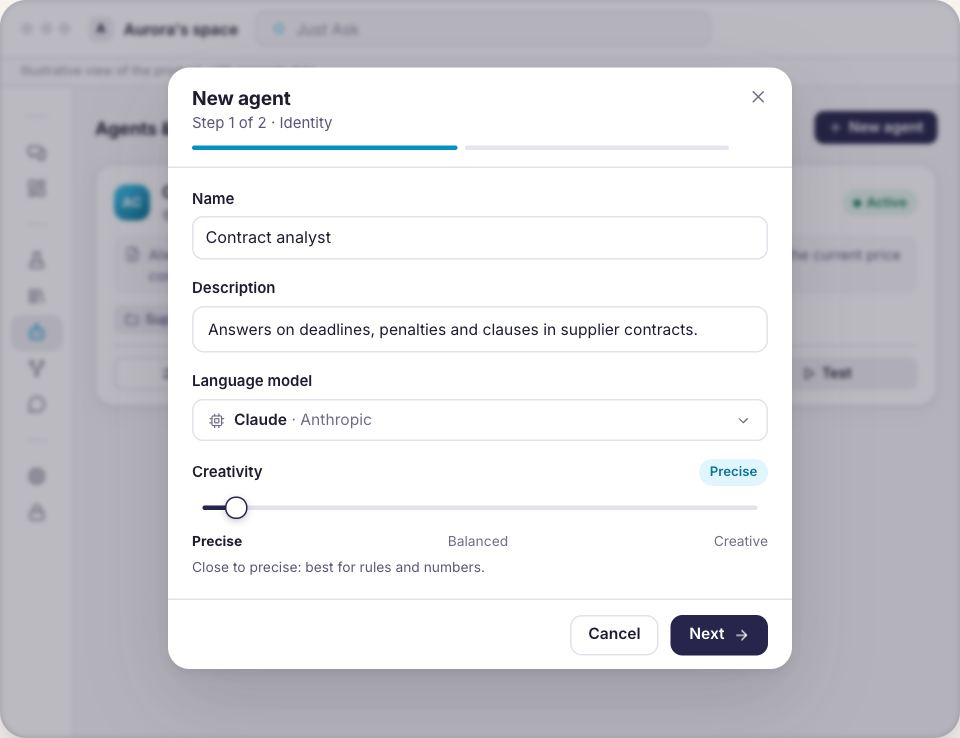
In the agent panel for intelligence and behavior you open the catalog grouped by provider and pick the model, and in the same place you set how much the answers may vary, from precise to exploratory.
Models from OpenAI, Anthropic, Google, DeepSeek and xAI in one catalog
Search by model or provider name, with a filter per provider
Changing the model changes one field, and instructions, knowledge and tools stay as they were
Chat
In the chat, Auto decides when you would rather not
The message box opens on Auto and Synapse picks the best model for that request, and the moment you call an agent with the at sign the picker steps aside, because what answers is the model that agent carries.
Auto by default, with Synapse picking the best model
You can pin a specific model to the message whenever you want
Call the agent with the at sign and its model takes over
Agents & Squads
One squad, several models working together
A squad carries a default model for the agents it creates itself, and every specialist keeps its own, so the same piece of work can pass through different models without anyone having to think about it in the moment.
A default model on the squad, so you can start without deciding
Every specialist keeps the model you chose for it
The squad runs in sequence or in parallel, with a leader closing the synthesis
Analytics
The comparison comes from your use, not from a promise
In Analytics, the costs tab breaks tokens out by model and shows the average input and output per query, which is where the cost concentrates, so comparing one model with another becomes a reading of what your operation has already done.
Tokens by model, over the period you choose
Input and output separated, to see where the cost concentrates
Who gets to read those numbers depends on the workspace permission
How that choice lands in your day
1
Describe what the agent does
The goal, the rules, the boundaries and the response format, in the language you speak.
2
Pick its model
In the same panel, with the catalog grouped by provider and a search by name.
3
Use it, compare it, change it
Usage shows up broken out by model, and changing it is a field, not a fresh start.
We can show this in your own context
Bring a piece of work your team already does today, and we will build the agent, choose the model alongside you and run the conversation in front of you.
The conversation starts from your case, not from a slide deck.
Changing the model does not change your rules
The same safety instructionsEvery call goes out inside the same envelope of rules, whichever model you chose.
No AI trainingWhat you send is not used to train AI models.
Answers with the sourceWhen the agent answers from the Knowledge Base, the answer shows where it came from.
Every run on the recordThe call is audited and accounted for in your workspace, model by model.
On TVBluey, the company behind Synapse, on TECH SC by Globo NSC
Questions about choosing the model
Who picks the model for each agent?
You do, inside the agent itself. The intelligence and behavior panel opens the catalog grouped by provider, and the choice is saved there alongside the instructions and the tools.
And when I simply open the chat?
The message box opens on Auto and Synapse picks the best model for the request. If you would rather decide, you pick a specific model right there before sending.
Can I change the model later?
You can, as often as you like. Instructions, knowledge and tools stay as they were, because the model is one field of the configuration and not the whole agent.
How do I compare two models?
Through use. In Analytics, the costs tab breaks tokens out by model and shows the average input and output per query, so the comparison comes from what your operation has already run.
Do I have to bring my own API keys?
No. The providers come configured with the platform, and the AI usage is accounted for in your workspace.
What happens when a new model generation arrives?
The catalog belongs to the platform and Bluey keeps it current. Your agents carry on with the configuration they have, and you decide when to move.
Pick the model, or let Auto pick it
Either way the decision is yours and it stays recorded on the agent. Let us build this around a piece of work your team already does.