The whole firm, in one place.AI reads and organizes. You decide.
Cases tracked every business day, pleadings drafted from the case folder, case law searched in plain language and clients served on WhatsApp — every answer with its source, and every deadline with a count you can audit. The AI finds and organizes; filing, signing and deciding stay yours.
From the case to the pleading, from the deadline to the client — in one short video.
The docket with a source on every entry, the pleading that opens reading the case folder, case law in plain language, the deadline with the full count, and the notices waiting for your decision.
Watch · 1:15 · 38 sIllustrative view of the product, with example data. The video has no sound: the captions are on screen.Read what the video shows
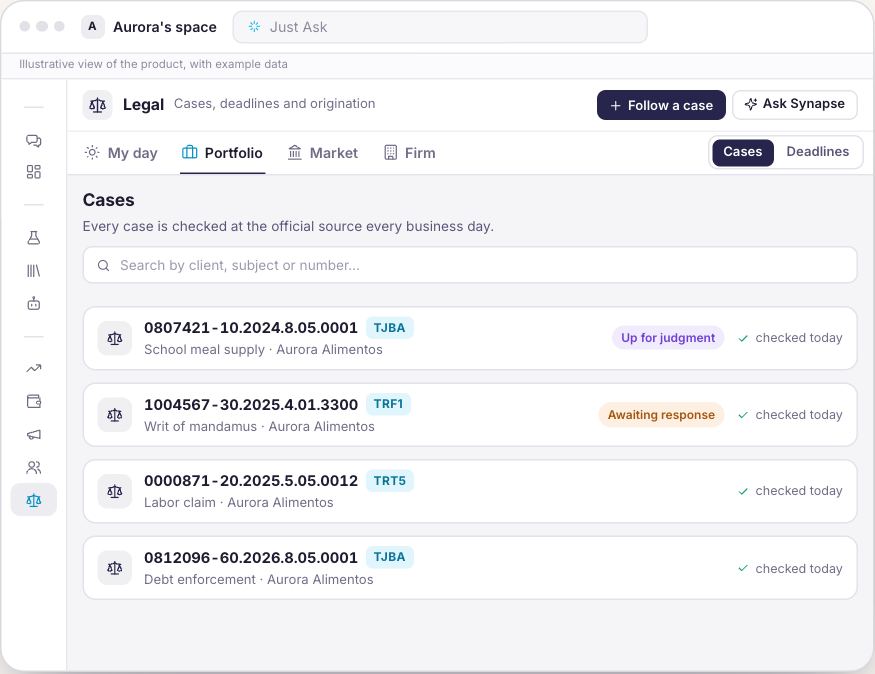
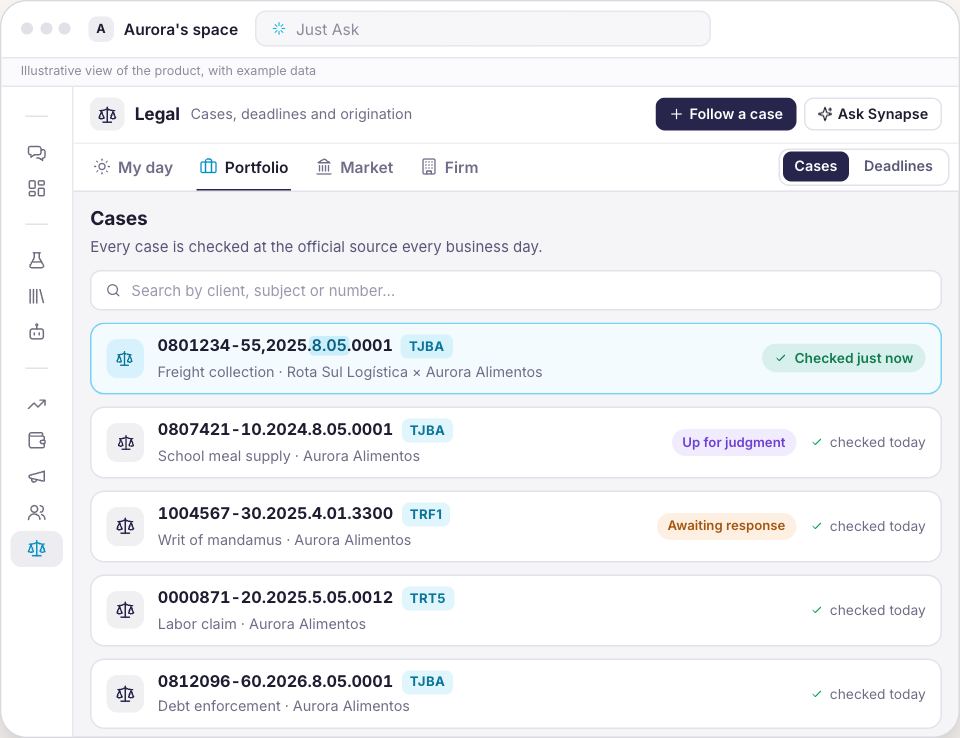
Legal: your cases, tracked every business day. Paste the case number: Synapse identifies the court and tracks the deadlines.
The case comes in by its number. Synapse keeps watch. Official sources checked every business day.
Formatted or not, the court is recognized. Follow a case: a CNJ or TCU case number.
The whole case, no court site needed. Every docket entry names its source.
Everything waiting for you today. Deadlines, notices and updates since you last looked.
The deadline, with the whole count. How many days were skipped, and why.
Published for you, decided by you. Record the deadline or No action needed, with the reason.
What it's about, where it stands. Case summary, dated. Draft a pleading, from the folder.
Have we done this before? Your own cases first. Then TCU and STJ rulings.
Deadlines have owners. Or everyone's. No owner? Then the deadline is firm-wide.
The number on paper. The deadline, count included. Meet Synapse.
The same firm, on the same Monday
On one side, the court website open in nine tabs and the deadline spreadsheet. On the other, one question and an answer with the cases behind it.
22:10checking whether the deadline falls after the holiday
927Today
Have we handled a case like this before?
The firm's own cases that match the term come first, with the client and the file. Below them, the TCU rulings and the STJ headnotes, each with the date of the session.
The firm's portfolioTCU rulings and STJ headnotes
With Synapse
The whole firm, not just deadlines
The Legal module brings the platform's capabilities — projects, knowledge, drafting, teamwork and client service — to the firm's routine. Every answer with its source, and the lawyer in control.
Case tracking
The court comes from the number itself, and docket entries arrive every business day. "My day" gathers what's waiting for you: deadlines coming up, unread notices and cases that moved — and the deadline comes with a count you can audit.
Projects & Knowledge Base
Every case is born with its own folder, holding the documents and the case context. Permissions are per folder: whoever can't access it doesn't get the content in an answer.
Drafting pleadings
To draft, the chat opens already reading the case folder. The AI assists; filing and signing stay acts of the lawyer.
Case law
Describe the matter as you would to a colleague. Your own cases come first, then the courts' rulings and summaries — each with the session date.
Teamwork
Every deadline has an owner. Until someone takes it, it shows for everyone; even overdue, it only leaves the list when someone completes it.
Client service
The firm's clients are served on WhatsApp and Telegram, and the answer only goes out after your approval.
The whole firm, screen by screen, in the order the work happens
Six screens, in the order the work actually happens. All of them exist today.
Legal
The case comes in by its number
There is no form to fill in. You paste the number the way it is on paper, punctuation or not, and Synapse recognises the court from the number itself: the CNJ single case number or the TCU case number. The first query to the sources runs as you register it.
With or without punctuation: the same case typed both ways is still one case.
The client name is optional, and it is there so you can find the case later by whoever you defend.
Every case you follow is born with a folder of its own in the Knowledge Base.
Legal
Docket entries arrive on their own
Every day Synapse asks the open official bases what moved: DataJud, from the CNJ, and the TCU case base. The case timeline gathers docket entries, rulings and gazette publications, and every entry says which source it came from.
Docket entries, cover, parties and publications arrive without anyone opening a court website.
Information without a date is not information: the file says how old the data is and when the source last answered.
The case record does not arrive: no free official source hands over the documents of a case.
Legal
What the courts published for you
The national electronic judicial gazette publishes for a lawyer, not for a firm. You declare the bar registrations the firm is served under, and whatever comes out for them lands in a triage queue every morning.
A publication for a case that is not in your portfolio shows up all the same, marked as such.
A cancelled publication keeps showing, with the warning: courts cancel and republish, and that is exactly what reopens a deadline.
Each one offers two paths: record the deadline, or mark it as needing no action, with the reason.
Legal
The count, read out loud
Synapse does not guess deadlines: it keeps the one you record. Give it the first day and how many business days, and the count comes back with its trail: every day that did not count, and why. It is arithmetic you can redo on your own calendar, not a number that simply appeared.
It only skips what the law guarantees: weekends, national holidays and the recess from 20 December to 20 January.
Carnival, Ash Wednesday and Corpus Christi are not skipped, and the warning appears when one of them falls inside the count.
The partner declares the days that court really did not sit, with the reason, and from then on the count is exact for the firm.
Legal
A sealed case stays sealed in search too
A case under seal appears only to whoever holds the specific permission, and that includes full-text search, which is the easiest way to find what one was not meant to see.
The permission is specific: being at the firm is not enough.
It holds in the list, in the case file and in full-text search.
The agreed fee is the partner's information too: reading a case does not mean reading the firm's price list.
Legal
What usually comes before a case
A radar reads four public sources every day looking for what tends to precede a case: a case just filed at the TCU, an order opening proceedings in a municipal official gazette, a sanction, a direct contract outside the usual pattern. Every signal arrives in a queue, with its origin and the date the source gave the fact.
A signal becomes a lead in Sales on a click of yours, with the origin on record.
The radar is born switched off: a partner turns it on after setting the firm's criteria.
Synapse finds and organizes, it never approaches: the lawyer is the one who writes and sends.
Three steps to get the firm started
1
Load the portfolio by number
Paste the numbers the firm follows. The court comes out of the number itself and the query starts right away.
2
Declare the bar registrations
Without them there is nobody to ask the gazette about. With them, whatever is published for the firm lands in the triage queue.
3
Record the first deadline
Give it the first day and how many business days. Then check the trail against your own calendar: that is what it is for.
An edition for law firms
The Legal area is born switched off, and it is switched on for your firm.
Sector edition
Synapse Legal
For law firms
You see the price before confirming any charge.
A case portfolio built by number, queried daily against the official bases
Gazette publications addressed to the firm's bar registrations
Deadlines with an auditable count and the days the firm declared
TCU rulings and STJ headnotes, with the firm's own cases ahead of them
The fee agreed on the case, and the receivable in Finance
You create the account and the firm's space, and the subscription opens right after, with the option you picked here.
Synapse never files and never signs. Drafting is assisted; filing and signing remain acts of the lawyer.
What this product refuses to do
The arithmetic is yours to checkEvery count shows the days that did not count and why. And it always errs on the safe side: the date shown is never later than the real one.
Cases under sealA sealed case appears only to whoever holds the specific permission, full-text search included.
Official sources, namedDataJud (CNJ), TCU, the national electronic judicial gazette, Portal da Transparência, PNCP and Querido Diário.
Silence never becomes certaintyWhen a source does not answer, the screen says so. “I could not check” is not the same as “nothing on record”.
Who trusts usBV Escritório de Advocacia is a client of Bluey, the company behind Synapse.
Start with Synapse Legal. Expand without starting over.
The next area joins the same workspace, with the same context, the same agents and the same approval rules.
No. It never files and never signs: there is no signing purpose in the system at all. Drafting a pleading is assisted, from that case's own folder, and the text arrives as an editable document for you to read, adjust and take to the court.
Does a publication become a deadline on its own?
No. Synapse captures, shows and organizes it; you are the one who records the deadline. You can ask it to read the publication and suggest the act and the number of days, but only if the text says so, and showing you the sentence it took that from. Most publications state no deadline at all, and in those the field stays empty.
What about municipal or state holidays?
The count does not know them: the system does not know your firm's district, and skipping a day it is unsure about would push the deadline later, which is the dangerous direction. It only skips weekends, national holidays and the recess from 20 December to 20 January. When your court did suspend something, the partner declares those days with the reason and the count becomes exact for the firm.
Does Synapse fetch the case record?
No. No free official source hands over the documents: reaching them means entering the court system as a lawyer, with a digital certificate. With an A3 token the key, by construction, never leaves your machine, so that path is you downloading at the court and adding the files to the case folder. What arrives on its own is docket entries, cover, parties and publications.
Which courts are followed?
The ones the open official bases publish: DataJud, from the CNJ, covers 91 court indexes, and the TCU case base covers accounts cases. We do not promise a connection to PJe, eproc, e-SAJ or Projudi.
Does case law tell me whether a precedent still stands?
No. It shows the status as the court itself publishes it and the date of the session, because a ruling may have been superseded by a newer one without its status changing at the source. The reading is the lawyer's. For STJ rulings, the open base publishes the headnote only.
Does the radar approach a prospective client?
Never. There is no bulk convert, no discard by rule and no message sent to a prospective client. Every decision is an act of the lawyer, recorded with a name and a date, and any contact is written and sent by them.
Do I have to switch anything on?
Yes. The Legal area is born switched off in the workspace: it is a sector edition, not a capability everyone already has.
Paste the first number.
The court comes out of the number itself, the docket entries start arriving on their own, and the first deadline already comes with arithmetic you can check.