Build it by describing it
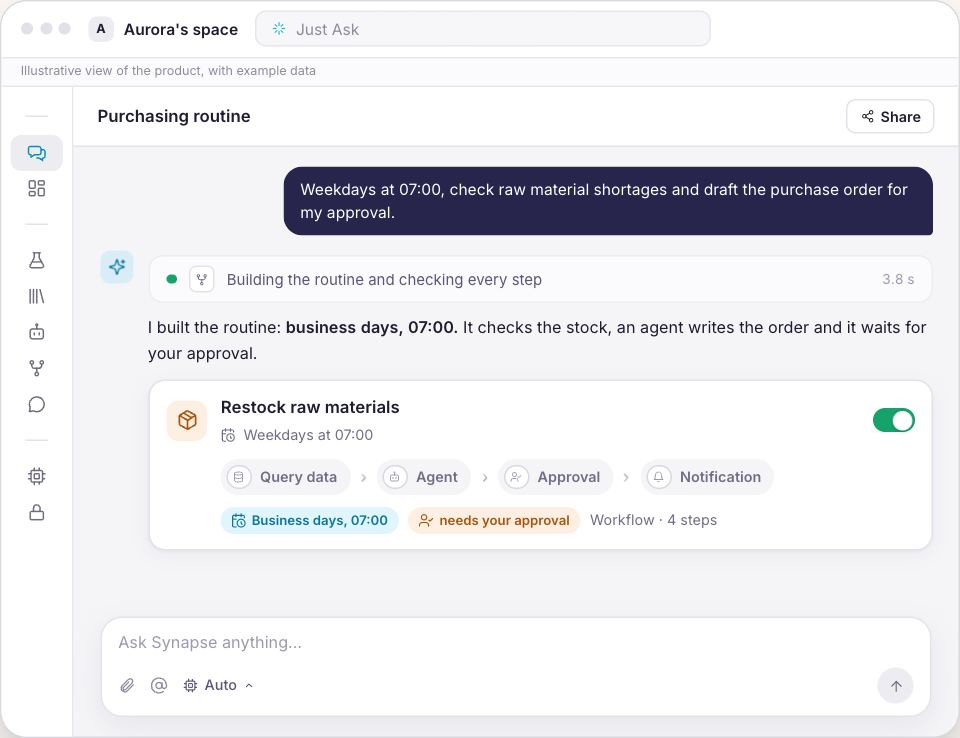
Describe the routine in your own words and Synapse builds the steps, checks them and schedules it. No flow to draw.
You draw the routine once. From then on it runs on a schedule or when something happens on the platform, and at the point where the business rule needs a person the run stops and waits for the decision.
The routine described in your own words, the steps built and scheduled, the pause where money is at stake, and the trace of every run.

The same routine, with the same human decision in the middle. What changes is who does the work of getting to it.
The Operations module turns repetitive processes into automations that run on their own and stop where someone needs to decide — with permissions, approval and a full trace of every run.
Describe the routine in your own words and Synapse builds the steps, checks them and schedules it. No flow to draw.
Actions, Integrations, Control and People: thirteen step types in four groups to build the routine the way it actually happens.
The automation runs on a schedule or when something happens — and goes on its own up to where the rule asks for a person.
Money or risk involved? The run pauses at the step and waits for your approval before going on.
Never beyond the badge of whoever runs it: read, write or delete. Without permission, it stays blocked.
Every run with input, output, duration and credits for each step — the proof of what ran, and why.
The same Monday, followed through the screens your team will use after creating the account.
You draw nothing to begin with. You write in the chat what happens every Monday, and the routine is built, checked and scheduled. Anything that cannot be undone stops and asks you to confirm first.
The flow is visible on a canvas: every step is a box and every arrow is the order. The steps fall into Actions, Integrations, Control and People, and it is in the People group that the step which halts everything lives.
Every assistant is written in plain language, like a procedure for someone on their first day. What it may do is ticked in a catalog organized by area, with a tag saying whether that reads, changes or deletes.
The human review step is not a notice that passes by: it suspends the run, notifies whoever decides, and only continues once someone approves. Rejecting cancels the whole run.
Every run keeps the step sequence with the input, the output, the duration and the consumption of each one. When something fails, the step shows the exact error message.
The renewal question is always the same: how many times did somebody still have to do this by hand? The platform answers without a new report.
Just one, with an owner and a clear beginning and end. The one your team redoes every Monday is the obvious candidate.
Draw the steps and place the human review before anything that leaves the company or touches money. Name who decides while you are building it.
Run it on demand a few times, then let the schedule fire it. Every run is recorded step by step.
Knowledge is knowing. Operations is doing.
For the operation that already knows which routine it wants off its hands.
The price of this offer is not published here yet. Create the account and we will talk it through before any charge.
You create the account first and choose the plan afterwards.
No lock-in. Cancel whenever you like and keep using it until the end of the paid period.
On TVBluey, the company behind Synapse, on Globo NSC's TECH SC
The run stays stopped. The approval step always halts the process, and with no reviewer named the request has no owner. Name who decides while you build the step; you can set a deadline and the rule that applies if the decision never comes.
Four things: someone clicks, the schedule fires, another system calls in with a signed request, or something happened in here. The events are the eight the platform actually emits, among them message received, lead created, transactions imported and data load finished.
Yes. Run it on demand as many times as you like before scheduling it. And a flow in draft does not run: not from the button, not from a schedule. Activating it is your decision.
The step shows the exact error message in the execution trace. You fix it and re-run from that step, without repeating what had already worked.
No. A routine can read a number through the query step, which carries up to 50 rows forward to the steps that follow. The data platform, with its catalog, metrics and notebooks, is a separate offer and is not included here.
The sync only reads. It pulls data from your systems and never changes or deletes anything at the source. Writing to another system happens through a tool configured case by case, never through the reading.
It can. A wait inside the flow runs straight through for up to 60 seconds; beyond that the run is suspended and resumed later, at the right time. For long pauses the way is a scheduled trigger.
You can. Runs in flight finish on the old version and the next ones use the saved version.

Start with the one your team redoes every week. If a month from now it is still being done by hand, we will say so before you ask.
Start with the Monday routine