Bank accounts and cards in one statement, every entry categorized by one of your rules or by the Accountant, Synapse's finance agent, and you reviewing only what's uncertain. A boleto (a Brazilian payment slip) that arrives on WhatsApp becomes a bill to pay, and your P&L and cash flow come from real transactions.
Every change stays in the Audit log, with before and after
From statement to P&L, in one short video.
The statement imported with nothing booked twice, the Accountant categorizing, a review of only what's uncertain, the boleto that becomes a bill to pay, and the P&L built from the transactions.
Watch · 1:15 · 33 sIllustrative view of the product, with example data. The video has no sound: the captions are on screen.Read what the video shows
Finance: from statement to P&L. Import your bank statement and the Accountant, Synapse's finance agent, categorizes each entry with rules and AI.
Upload the statement. The Accountant sorts it. Rules and AI. You review just the maybes.
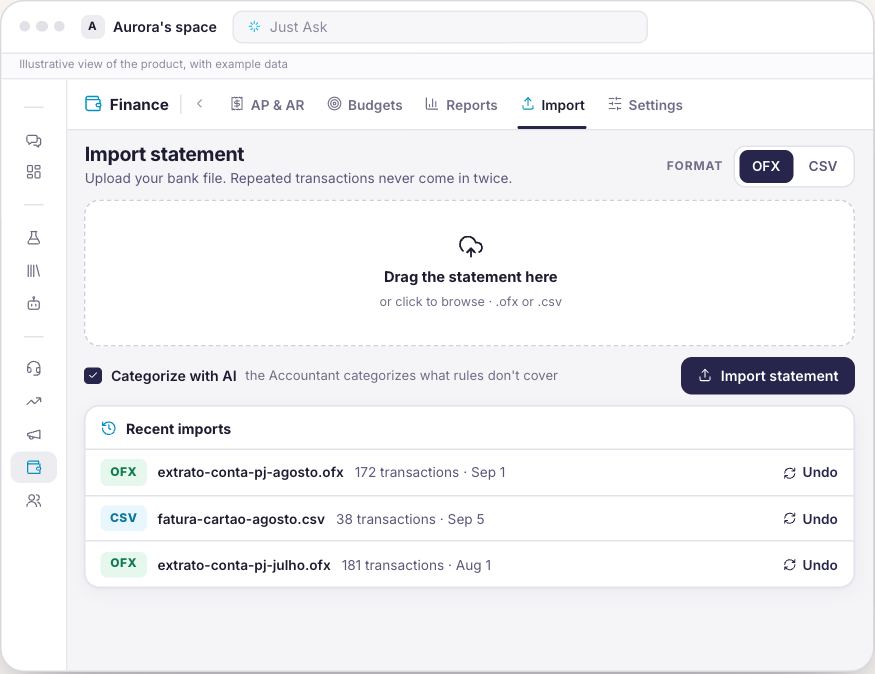
OFX or CSV, nothing booked twice. Re-imported? Duplicates are skipped.
Every account, one statement. Cash position and the source of each category.
You review just the maybes. Accept or Reject each suggestion from the Accountant.
One rule, and next month sorts itself. By keyword, CNPJ (tax ID) or pattern, for every future import.
Snap a boleto, it's a bill to pay. Over WhatsApp or Telegram: Synapse extracts, you approve.
Bill paid, reconciled to the bank. Reconcile: the bill tied to the actual transaction.
Your P&L, built from transactions. P&L, cash flow and cash runway, from real transactions.
You set the autonomy. Everything audited. Agent autonomy and an Audit log with before and after.
Less manual entry. More results at a glance. Meet Synapse.
From statement to P&L, with no manual entry.
The same month followed from start to finish: the statement that comes in, the category each entry gets, the boleto that becomes a bill to pay, and the P&L that comes out of the transactions.
Finance
The statement comes in once, nothing booked twice
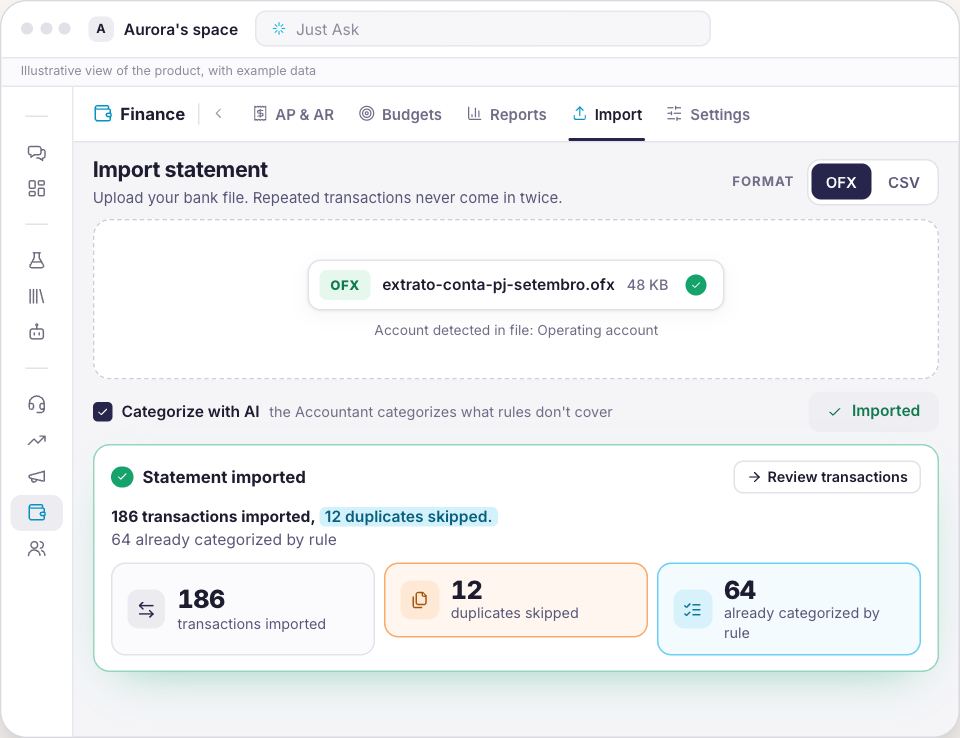
Import your bank file as OFX or CSV. An OFX file creates the account on its own, and re-importing a period that's already in skips the repeated transactions instead of booking them again.
OFX or CSV, with the account recognized from the file itself
Duplicates skipped on re-import, with a summary of every import
Today the statement comes in by import: there is no automatic bank connection yet
Finance
Every entry arrives categorized, and says by whom
Accounts and cards become one statement, with your cash position at the top. Each line shows where its category came from: one of your rules, the Accountant, a person, or To review when no one was sure.
Cash position summing the balances, with the date of the latest statement
Outflows only take expense categories, and inflows only revenue ones
Duplicate payments and unusual amounts show up as anomalies, with a severity level
Finance
You review only what's uncertain, and what repeats becomes a rule
The Needs review filter shows only what the Accountant couldn't categorize with confidence, each line with its suggestion and percentage. You accept or reject. A vendor that shows up every month becomes a rule, and future imports come in already categorized.
Rules by keyword, CNPJ (company tax ID) or pattern, with priority
Rules apply first, and the Accountant suggests what they don't cover
Accepting or rejecting is your call, line by line
Finance
From a boleto on WhatsApp to a reconciled bill
An NF-e (Brazil's electronic invoice), a boleto or a receipt arrives as a photo on WhatsApp or Telegram, or through the Send document button. Synapse extracts the amount, due date and counterparty, you approve, and the bill shows up in AP & AR. When the payment appears on the statement, reconciling ties the bill to the actual transaction.
Payables and receivables, with recurring bills and settlement
Reconciliation shows why the transaction matched: amount, CNPJ or name
The extracted data stays in view so you can check it before approving
Finance
Your P&L comes from real transactions
Reports builds the overview, the P&L and the cash flow from what was categorized and from the bills in AP & AR, with your cash runway and your largest vendors and customers. Budgets compares budget to actual by category.
P&L by category, with revenue, expenses and net income
Cash flow projected from what's still to be received and paid
Budget vs. actual, with actuals calculated from the transactions
Finance
You decide how much the agents do on their own
In Settings, agent autonomy has three levels: Suggest, Auto by exception and Auto + reconcile. At any of them, the Audit log keeps who changed what, with before and after.
At the Suggest level, nothing changes without you
Audit log split by people and by agents
Every recategorization with the old category and the new one
From your first statement to your first close.
1
Import one month
Upload the OFX or CSV for each account and card. The account is created from the file itself, and nothing that's already in comes in again.
2
Review what's uncertain and create rules
Accept or reject the Accountant's suggestions, and turn your every-month vendors into rules.
3
Close with the reports
Reconcile what was paid, check the P&L and cash flow, and track budget vs. actual.
One door, starting with your statement.
Finance brings the unified statement, categorization, payables and receivables, and reports, plus what comes with every door: chat, projects, templates and your business context.
The Finance door
Finance
For finance teams still closing the month in spreadsheets
Priced on request: the scope starts from your statement and your accounts.
OFX and CSV import, nothing booked twice
Categorization by rule and by the Accountant, with the source on every line
Review of only what's uncertain
Boletos, NF-es and receipts via WhatsApp or Telegram
Payables and receivables, reconciled to the statement
It starts with a 20 to 30 minute proof session, using one month of your company's statement.
Why you can trust what was categorized.
Rules come before AIThe rules you wrote apply first. The Accountant only suggests what no rule covers, and shows the confidence of each suggestion.
Every category says where it came fromRule, AI, Manual or To review: the source sits on the line itself, and the Needs review filter sets apart what no one has confirmed.
Who changed what stays on recordThe Audit log records people and agents, with the before and after of every change.
It says what it doesn't do yetThe statement comes in by OFX or CSV import. There is no automatic bank connection yet, and this page says so before you ask.
On TVBluey, the company behind Synapse, on Globo NSC's TECH SC
Start with Synapse Finance. Expand without starting over.
The next area joins the same workspace, with the same context, the same agents and the same approval rules.
Not yet. The statement comes in by OFX or CSV import, and an OFX file creates the account on its own. Re-importing a period that's already in duplicates nothing.
Does this replace my ERP?
No. Finance organizes the statement, payables and receivables, and reports from real transactions. Where the company already has an ERP, Synapse can read from it through a connector instead of replacing it.
How does the Accountant choose the category?
The rules you wrote come first, by keyword, CNPJ (company tax ID) or pattern. Whatever no rule covers gets a suggestion from the Accountant with a confidence percentage, and anything uncertain goes to the Needs review filter.
Can I send a boleto over WhatsApp?
Yes. An NF-e, a boleto or a receipt arrives as a photo on WhatsApp or Telegram, or through the Send document button. Synapse extracts the data, you check and approve it, and the bill shows up in AP & AR.
Do the agents do everything on their own?
You pick the level: Suggest, Auto by exception or Auto + reconcile. At any level, the Audit log keeps who changed what, with before and after.
Which reports come ready-made?
Overview, Profit & loss and Cash flow, with your cash runway and your largest vendors and customers, plus budget vs. actual by category. All calculated from categorized transactions and the bills in AP & AR.
Your next close can start with the statement.
Bring one month's statement and watch the Accountant categorize it in the proof session.